Over the years I have collected quite a number of Raspberry Pi devices that at one time or another served a useful purpose but now are collecting dust. Not one to throw anything away I was keen to see if I could use the oldest of these devices, a Raspberry Pi Model B, for something useful.
The rest of this article contains a large dose of AI, so if that’s not for you, move along now.
Some Interesting Ideas
This is my original Raspberry Pi Model B. It has served me well over the years mainly as a Pi-hole but I moved that functionality to Home Assistant a while ago and so this little thing was surplus to requirements. Could I bring it back to a useful life through?

Outsourcing the Ideation
I’m not great at thinking up ideas, so I decided that given this was going to be an AI project I might as well go all in on it and put this to ChatGPT to tease out some suggestions:
What are some good projects for a raspberry pi 1. I am not a gamer, I already have an ad blocker as part of home assistant and my printer’s wireless so you can discount those.
And this was the response, exactly as presented to me:
Here are my five favourite ideas specifically for your original Raspberry Pi Model B. I’ve excluded gaming, ad blocking and wireless printing.
1. A dedicated network watchdog
My top recommendation — useful, inexpensive and a good programming project.
The Pi sits on your network and continuously checks that your important devices and services are working.
For example, it could monitor:
- Your Home Assistant installation.
- Your ebook server.
- Your internet connection.
- Your router.
- Your other self-hosted services.
Every minute, it checks whether each target responds and records the result in a small SQLite database.
If your internet connection drops, the Pi records when the outage began and when connectivity returned.
What makes this interesting?
You could develop the whole thing yourself in Python or PHP.
I’d start with a simple script that writes results to a CSV file. Then add SQLite storage, a basic web interface and perhaps email notifications.
One particularly useful feature would be a daily uptime report showing how often each service was unavailable and how long outages lasted.
The Pi would operate independently of the systems it monitors, which is valuable when diagnosing network problems.
It would also consume very little electricity.
Difficulty: Easy initially, with plenty of room to extend it.
2. An aircraft-tracking receiver
If you enjoy watching aircraft, this is an interesting project that can turn the Pi into a small aviation receiver.
Aircraft transmit position and identification information using a system called ADS-B. With a suitable USB software-defined radio (SDR) receiver and antenna, you can receive these transmissions and display aircraft on a map.
A typical setup consists of:
- Your Raspberry Pi.
- A compatible USB SDR receiver.
- An antenna suitable for 1090 MHz.
- Aircraft-tracking software.
The original Pi Model B has been used for aircraft tracking with software such as PiAware, although you’d need to check current software compatibility with its ARMv6 processor.
The Pi would receive aircraft signals and process them locally. You could view the resulting aircraft positions from another computer.
The catch: You’d need to buy an SDR receiver and antenna, and the software installation may require more work than on a modern Pi.
I’d choose this if aviation interests you and you’re happy to spend a little money on additional hardware.
3. A dedicated sensor and data-logging station
This is particularly appealing because of your existing Pico and BME690 air-monitoring project.
Rather than having the Pi take measurements itself, you could use it as a central data collector for sensors around the house.
For example, it could receive readings from:
- Your Pico air-quality monitor.
- Temperature and humidity sensors.
- Other microcontrollers.
- MQTT devices.
It could store the readings in SQLite and provide a small web interface showing historical measurements.
A possible extension
You could build a standalone environmental monitoring dashboard that displays temperature, humidity and air-quality measurements over time.
Home Assistant already does some of this, so I’d avoid duplicating its existing functionality.
Instead, I’d use the project to experiment with data collection, database design and graphing, perhaps using a separate experimental sensor.
The Pi 1 is more than capable of collecting a modest volume of sensor readings. The challenge will be selecting compatible software and deciding how the sensors communicate with it.
Difficulty: Easy to intermediate.
4. An offline reference server using Kiwix
We discussed this earlier, and I still think it’s worth considering.
The Pi would host a collection of reference material that you could access from any browser on your local network, even if your internet connection went down.
You could use it for offline Wikipedia, reference books or other available collections.
You’d download the content on your Mac and copy it to the Pi.
The difficulty is that the original Pi uses an ARMv6 processor, so modern Kiwix server releases may not be compatible. We’d need to identify a suitable software version before committing to this project.
There’s also a practical consideration: you already have an ebook server, so I’d choose this only if you specifically want an offline encyclopaedia or reference collection.
Difficulty: Intermediate, primarily because of the old hardware.
5. A lightweight personal API server
This might be the most interesting option from a programming perspective.
You could build a small Linux service that accepts HTTP requests, processes the data and returns JSON.
For example, you could create an API that accepts readings from a sensor, validates them and stores them in SQLite.
You’d learn about:
- HTTP requests and responses.
- API authentication.
- JSON.
- Database operations.
- Linux services.
- Scheduled jobs and logging.
You could write the application in PHP, although the available PHP version would depend on the operating system you install.
I’d keep it local to your network rather than expose an old system directly to the internet.
The Pi would be a useful test environment for small applications, particularly if you want to experiment with services that run continuously without requiring much processing power.
Difficulty: Easy to intermediate, depending on how ambitious you make the application.
Which would I choose?
Here’s how I’d rank them for you.
| Project | Cost | Practical usefulness | Programming opportunity |
|---|---|---|---|
| Network watchdog | Virtually nothing | High | High |
| Aircraft tracking | SDR and antenna required | Moderate | Moderate |
| Sensor data logger | Low if you have sensors | High | High |
| Kiwix reference server | Storage may be needed | Moderate | Low to moderate |
| Personal API server | Virtually nothing | Moderate | Very high |
These projects are realistic candidates for the original Pi, although the availability of compatible operating systems and packages is a consideration for all of them. The Raspberry Pi community has continued to use original Model B boards for lightweight monitoring, data collection and similar tasks.
Introducing pi-watchdog
I thought that most of those ideas were pretty sound. The skies above our house are occasionally used to keep planes in a holding pattern on their approach to Heathrow, so the aircraft tracking appealed. I couldn’t imagine a need to consult Wikipedia when the internet was down, so building something I didn’t think I would use ruled that out. The data logging and the API server didn’t appeal so that left only one…
I have been a long time user of UptimeRobot and it has served me well but I liked the idea of hosting this myself and having greater control over it so “A dedicated network watchdog” it was to be.
As I said at the beginning, this was to be a completely AI driven and written project. I am not, like some, against the idea of AI (or “vibe”) coding. After 40 years of developing without AI I know where my strengths and weaknesses lie. For example, I am great at reviewing code and hopeless at user interface design. AI is definitely stronger at the latter so I wanted to make the most of that.
What to cover?
In conversation with ChatGPT we looked at what you might do to determine availability:
| Check | What it tells you | What it won’t tell you |
|---|---|---|
| Ping the server | The machine is reachable over the network | Whether its websites are working |
| Check an HTTP URL | A web server responded to a request | Whether the underlying application is functioning correctly |
| Check a specific application endpoint | That particular application is responding as expected | Whether other services on the machine are healthy |
| Check a TCP port | Something is accepting connections on that port | Whether the service is actually functioning correctly |
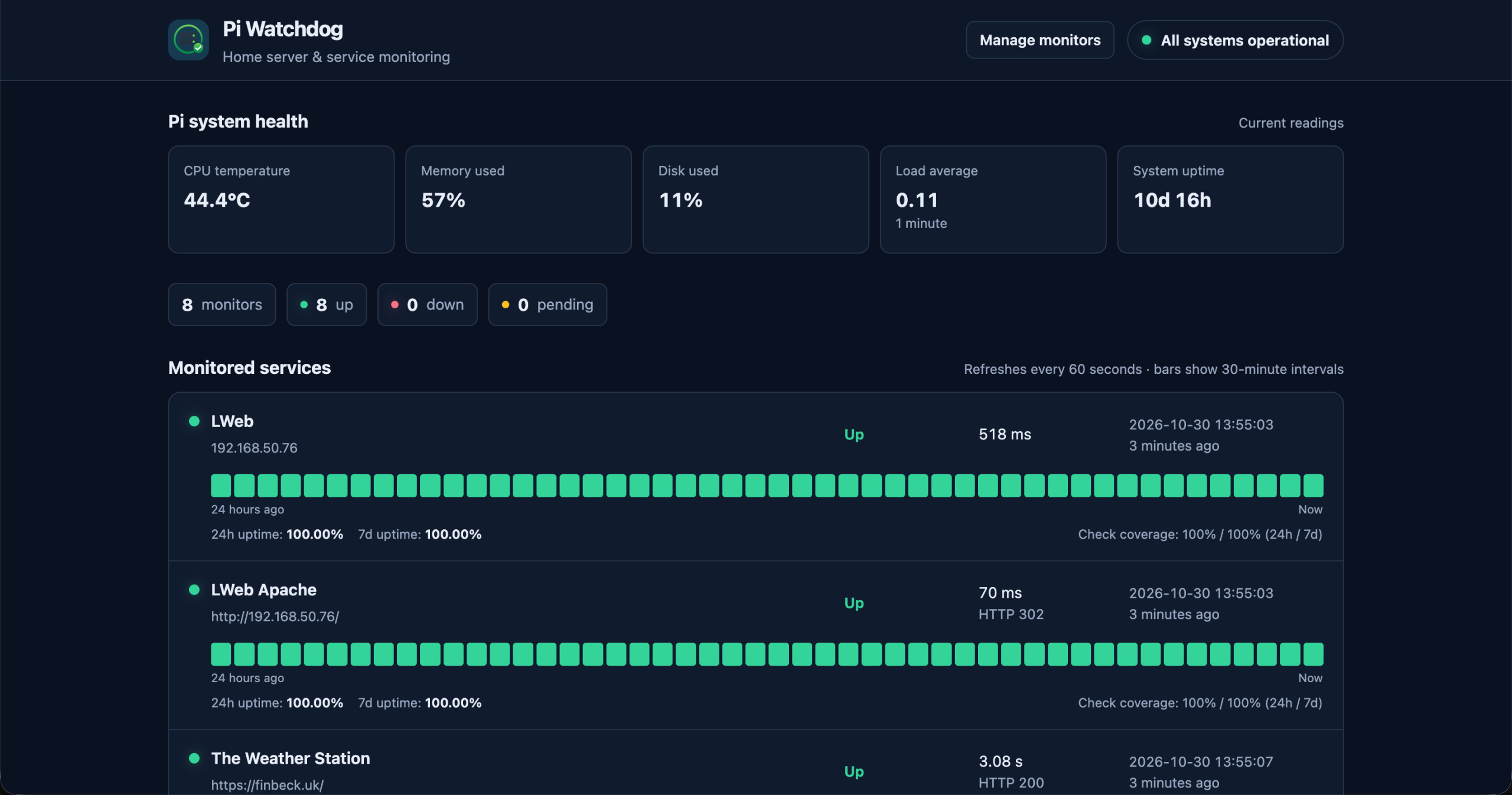
This gave a starting point for what to monitor, so I set ChatGPT to work on creating a first version. This allowed sites to be monitored, but the management was all done via SQL statements to the database. The next step, therefore, was to add an admin panel to deal with monitored hosts. Surprisingly, this was done as a separate page detached from the rest of the app. It looked different to the main page and couldn’t be reached from it. My next prompt was to ask for a shared style sheet and a way to easily move back and forwards between the admin and monitoring pages. From this I learned that you have to be very prescriptive with your prompts and test what is delivered well to make sure it actually does what you expect.
There is no point monitoring something if you don’t then know when the status has changed. For years I have been using Pushover to send notifications from my applications. I asked ChatGPT to therefore add push notifications when a service goes down and comes back up again. Within a couple of minutes that too had been added. I think that at some point in the future I will also add email notifications too.
The app’s output pages were much better looking and detailed than I had imagined and certainly far above anything that I could have achieved from a design point of view. Looking at the app and the images shown here, it is easy to see where ChatGPT got its inspiration from – UptimeRobot. I am not going to go through the rights and wrongs of that here, other than to say that I think how all the AI companies trained their models on copyrighted information was wrong, but now that horse has very much left the stable.
Packaging it Up
I have had the app running on my Raspberry Pi now for a couple of weeks and works just as well as UptimeRobot in detecting server downs. I will keep them both running in parallel for a few weeks more but will probably switch off UptimeRobot completely before the end of the year.
I had one last job for AI to do before I wrapped it all up and that was to create a README file that I could use for the project. However, I use a particular format for my project README files so I fed ChatGPT one of the previous ones that I had created by hand and got it to copy that format. It made a pretty good job and all I need to do was add some images and review the content before pushing to GitHub.
All this has been an interesting experience and has allowed me to quickly deliver a functional app. On the one hand, I see this as democratising software development, allowing almost anyone to create apps for their particular needs. However, I also feel that having all these apps released into the wild is not necessarily a good thing, particularly if they haven’t been properly QA’d.
That all said you can find the code for pi-watchdog here.
