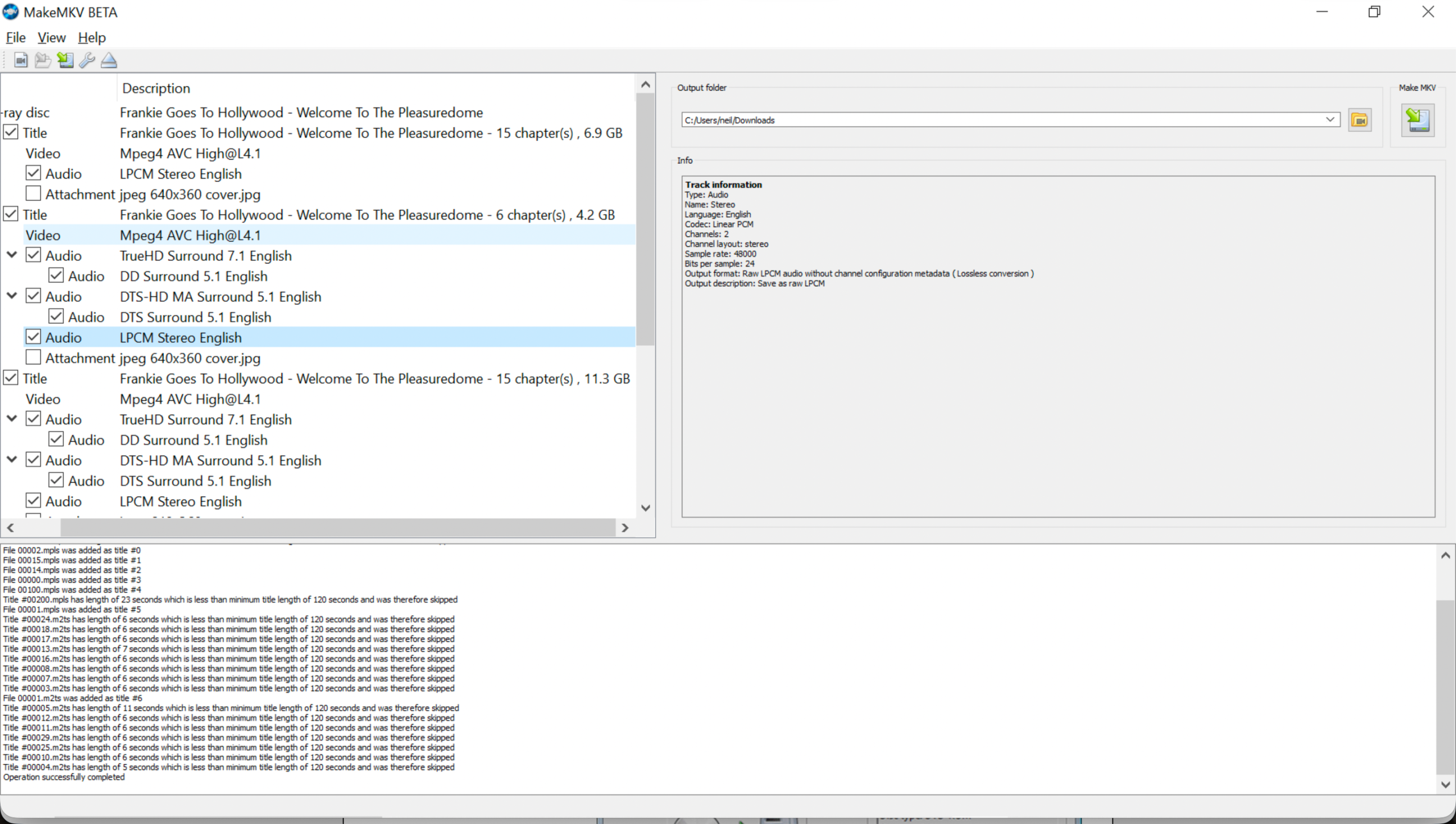
I have been buying quite a few blu-ray audio discs recently, which is something of a surprise as I don’t actually have a hi-fi system capable of playing any of the spatial audio. So why have I bought them then, you may well ask. Well, first and foremost, I am a collector and these blu-ray’s are of bands that I like. The other reason is that they all contain new stereo mixes and other oddities such as instrumentals mixes. But how to access them…
Extracting Audio
First off, a word on the legalities of the following. In some locales it may be illegal to make a copy of a disc that you legally purchased or to format shift it, i.e. rip the files to flac/mp3 etc. You should check your local rules for you can and cannot do. Moving on…
The other thing to keep in mind is that we are only talking about music tracks and not video.
Step One: Rip the files from the disc
Before you can get access to the music files you need to extract them from the disc and, as you will see, they arrive as a single file and not nicely separated tracks. To extract the file(s) we’ll use MakeMKV. This requires a key to use which is free while it is in beta. It has been in beta for years…
Select the tracks that you want to extract. You’ll need tracks that are marked as “Stereo” rather than “Surround”. Tick those and untick any others – see the image at the top for the page for an example. The click the Make MKV button and let it do its stuff.
Step Two: Create a CUE Sheet
As the make MKV process will have provided just a single file rather than all the tracks we need a way of separating them out. To do this we need to create what is called a cue sheet. For this I have written a little Python script to take the extracted file and output a CUE sheet from it.
This is the script, remember to change the input and output file names and locations:
python3 -c "
import json, subprocess

mkv = '<input filename>.mkv'
cue_file = '<output filename>.cue'

cmd = ['ffprobe', '-v', 'quiet', '-print_format', 'json', '-show_chapters', mkv]
data = json.loads(subprocess.check_output(cmd).decode('utf-8'))

with open(cue_file, 'w') as f:
    f.write('FILE \"audio_stream.flac\" WAVE\n')
    for i, ch in enumerate(data.get('chapters', []), 1):
        s = float(ch['start_time'])
        m, s = divmod(s, 60)
        h, m = divmod(m, 60)
        frames = int((s - int(s)) * 75)
        time_str = f'{int(m + h*60):02d}:{int(s):02d}:{frames:02d}'
        title = ch.get('tags', {}).get('title', f'Track {i:02d}')
        f.write(f'  TRACK {i:02d} AUDIO\n')
        f.write(f'    TITLE \"{title.strip()}\"\n')
        f.write(f'    INDEX 01 {time_str}\n')
print('CUE sheet created successfully!')
"
Run that from the command line and it will give you a file that will look something like this:
FILE "audio_stream.flac" WAVE
  TRACK 01 AUDIO
    TITLE "Chapter 01"
    INDEX 01 00:00:00
  TRACK 02 AUDIO
    TITLE "Chapter 02"
    INDEX 01 07:10:43
  TRACK 03 AUDIO
    TITLE "Chapter 03"
    INDEX 01 08:47:06
  TRACK 04 AUDIO
    TITLE "Chapter 04"
    INDEX 01 11:57:46
  TRACK 05 AUDIO
    TITLE "Chapter 05"
    INDEX 01 20:17:06
  TRACK 06 AUDIO
    TITLE "Chapter 06"
    INDEX 01 22:25:31
Finally, edit the cue sheet and add track titles as needed.
Step Three: Split the file into individual tracks
The final step is to put the two together and take the cue sheet that you created above, and use that to the source into individual tracks. For this we use the following Python script, again run from the command line in the same place as the source files.
This is the script, remember to change the input and output file names and locations:
python3 -c "
import re, subprocess, sys

cue_filename = '<cue filename>.cue'
mkv_filename = '<input filename>.mkv'

def cue_to_seconds(time_str):
    m, s, f = map(int, time_str.split(':'))
    return m * 60 + s + (f / 75.0)

with open(cue_filename, 'r') as f:
    cue_content = f.read()

tracks = []
raw_tracks = re.split(r'TRACK\s+', cue_content)[1:]

for t in raw_tracks:
    track_num_match = re.search(r'(\d+)\s+AUDIO', t)
    title_match = re.search(r'TITLE\s+\"(.*?)\"', t)
    index_match = re.search(r'INDEX\s+01\s+(\d{2}:\d{2}:\d{2})', t)

    if track_num_match and title_match and index_match:
        num = int(track_num_match.group(1))
        title = title_match.group(1)
        start_sec = cue_to_seconds(index_match.group(1))
        tracks.append({'num': num, 'title': title, 'start': start_sec})

for i, track in enumerate(tracks):
    start = track['start']
    num = track['num']
    title = track['title']

    # Clean up filename for safety
    safe_title = re.sub(r'[\/\\\\:?*\"<>|]', '', title).strip()
    out_file = f'{num:02d} - {safe_title}.flac'

    cmd = ['ffmpeg', '-y', '-i', mkv_filename, '-ss', str(start)]
    if i < len(tracks) - 1:
        next_start = tracks[i+1]['start']
        cmd.extend(['-to', str(next_start)])

    cmd.extend([
        '-vn',
        '-acodec', 'flac',
        '-metadata', f'title={title}',
        '-metadata', f'track={num}',
        out_file
    ])

    print(f'Extracting Track {num:02d}: {title}')
    subprocess.run(cmd, stdout=subprocess.DEVNULL, stderr=subprocess.DEVNULL)

print('\nAll tracks extracted and tagged successfully!')
"
And that should be that. Take your files and stick them wherever you want to play them, for me they end up on Plex. Enjoy!