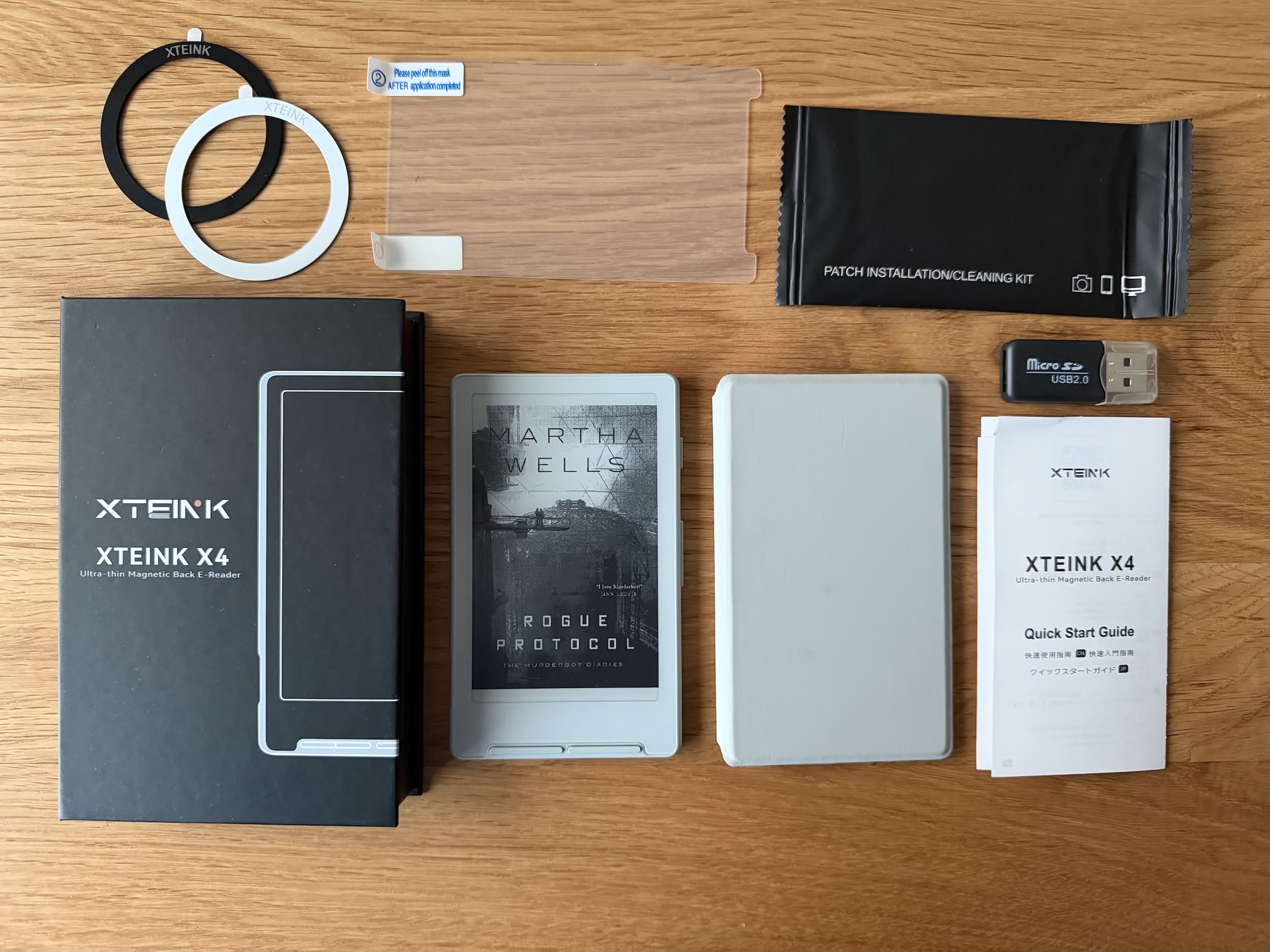
I posted recently a video of me unboxing the Xteink X4 reader and I said that I would post a longer review once I had a chance to use it. This is that review.
How I read
I’ve never really considered myself to be an avid reader, but when compared to the rest of the country, it seems that I am a voracious reader. Where 40% of people in the UK don’t read any books at all in a year, I find myself in the top 8% who read more than 30 a year.
I read a mixture of both physical and ebooks, but the vast majority are the latter, and to date, they have all been read via the Kindle app on my iPad Mini. The Mini seems to be the ideal size for reading ebooks in that it is close in size to a paperback and, of course, a Kindle device itself. A further advantage of the iPad is that it can do so much more, but this can be a distraction too, of course. And while it is realatively small it is not the most portable of devices, especially when it has a protective case on it too.
Enter the Xteink X4
I can’t remember where I first saw the Xteink X4 but it was almost certainly on Reddit where there is a pretty active subreddit.
It’s Tiny!
The X4 is a traditional eink device with a big difference – it is tiny! The display is just 4.3 inches across and the device itself measures only 114 × 69 × 5.9 mm. To put that into some sort of context it is roughly the size of a modern smartphone – about the same width as my iPhone 17 Pro and 2/3rd the height. It is very, very portable.
The manufacturers make a big thing of the size of the device, as rightly they should, but also about the fact that it is so small it can stick to the back of a phone. There are several marketing pictures on their website showing this. The X4 has a magnetic ring built into the back of it so that it can stick to the back of your phone in the same way any “Magsafe” accessory would. The issue here is that while the X4 is small it is not THAT small and you need a phone such as a iPhone Pro Max for this to work. In my experience the magnetic hold also wouldn’t be strong enough. Best bet is to buy assuming it won’t snap to your phone.
In use
The device feels really good in your hand and has four buttons, three of which are rockers, for operating the device within easy reach. The top right button turns the device on and off, while the others all have two positions to click (top and bottom or left and right), and their use depends on what you are doing and the firmware in use, more on that later.
As there is no touchscreen, all interactions with the UI are via these rocker buttons, which can make for an interesting experience, particularly when entering a Wi-Fi password! However, once you get used to it, it quickly becomes second nature.
The screen itself is very clear and readable but it is obvious that this isn’t the best of electronic paper display available. Others have also stated that the screen tends to fade in bright sunlight but that’s not something I have experienced and is solved with a screen refresh. Speaking of which the refresh is more obvious on this device than on more modern Kindles, for example, but isn’t an issue.
I was worried that because of the small screen size, there would be much less room to display text, and I’d be constantly clicking the next button. This turned out to not be the case, and you can see from the images below that the X4 gets pretty close to the amount of text that you get when using the Kindle app on an iPhone.


This is a good time to talk about the price. If you buy directly from the Xteink site (as I did) the device will cost you $70 (about £51) but it can also be bought on Aliexpress where you will pay less but won’t get the support from Xteink should you need it.
Look and Feel
Let’s talk about that user interface… By default the X4 comes with a stock firmware provided by Xteink and, depending on where you buy from, it might be in Chinese or English (it’s easy to flip between the two). It is pretty basic and struggles with formatting some ebooks, although it is receiving plenty of updates to fix some of the issues.
Never fear, the community has come to the rescue with a number of third-party firmwares that allow you to “flash” your device, give it a new look and more advanced features. As I write this there are several to choose from including Papyrix, TernReader and probably the most mature, if you can call something just a few months old mature, Crosspoint.
Crosspoint
Pretty much the moment I opened the box, I re-flashed my X4 with Crosspoint, as from what I’d read, that was going to give me the best reading experience, which after all is what it’s about. It was very easy to do; just plug in your device, choose the latest Crosspoint file, click to load, and wait. In my experience, it takes only about 5-10 minutes. Reboot your device, and then Crosspoint will load. I’ll probably do a post specifically about Crosspoint sometime in the future, so I won’t go over it in too much detail now other than to say that there are lots of options to configure the device and the reading experience is great.
Here are a couple of points to consider regarding Crosspoint (or any other non-stock firmware):
- It is a community-led project and not sponsored by Xteink themselves, so if that concerns you or you feel you might need support, then stick to the stock firmware.
- There is a small possibility that you might “brick” your device. Certainly, keep a backup of your previous firmware before changing it, so you have something to go back to.

Accessories
The X4 comes with some accessories in the box, namely:
- 1x screen protector
- 1x USB-A microSD card reader
- 2x magnetic rings.
But you can, of course, purchase more from the official website, such as a couple of different cases and a magnetic light. There are also beginning to appear third-party cases, such as the one shown below. I have ordered one of these cases and will report back once it arrives.

Magnetic Case
I ordered the magnetic case at the same time as the device, and I have to say that I really like it. It complements the device really well. The case sticks on to the device with a really strong magnetic grip on the back – in fact, in some cases, it is too strong, and I struggle to get it off! There is also what feels like a much weaker magnet holding the flip cover over the front of the device. Given that without a case of some sort, the screen is exposed, this was an essential purchase for me. I do take it off the case when reading, though.
Official Light
One of the downsides to the X4 is that it doesn’t have a front light like a Kindle might which means that you cannot read in the dark. To get around this Xteink sell an external light that snaps to the magnet on the back of the X4.


It’s not immediately obvious how you charge the light but it turns out that there are a couple of prongs at the bottom of it that you push in to a USB-A charger. I find this slightly frustrating as I am trying to move everything over to USB-C. Xteink have put a USB-C port on the X4 but have taken the odd decision to do something different with the light.
In use, I found the light distribution to be uneven across the screen, which I found a bit annoying. Also, the light doesn’t fix to the back of the X4 as securely as I would have liked, and certainly not as well as it does to the flip case. There are third party lights that others have recommended, such as this one from Ulanzi, so I may try that instead.
To be honest, I don’t think I will be using it much at night or in dark locations so the light isn’t really a deal breaker for me.
Screen Protectors
I can’t be the only one that hates screen protectors. I would happy pay for someone to apply the damn things without dust or bubbles. That aside I do think that they are necessary to protext the screen so I have managed to attach one successfully (at the third attempt!). I used the matte protector and once on I really can’t notice any difference so I’d say it was pretty perfect.
Conclusions
TL;DR I love it. It feels great in the hand and is easy to read without eye strain. However, for me, the use case is going to be for when I am travelling and not reading at home. To me, the X4 is all about portability, and it excels at that, but I don’t need that at home, so I will stick with my iPad Mini there. Of course, with no ability to sync between the two, there will be some manual work involved, but that’s a minor inconvenience.
Now all I need is to find a leather slipcase for it that matches what I have for my phone…
| Pros | Cons |
|---|---|
| Lightweight and portable | Poor stock firmware |
| Good battery life | No back (or front) light |
| Cheap |
One comment on “Xteink X4 Review”