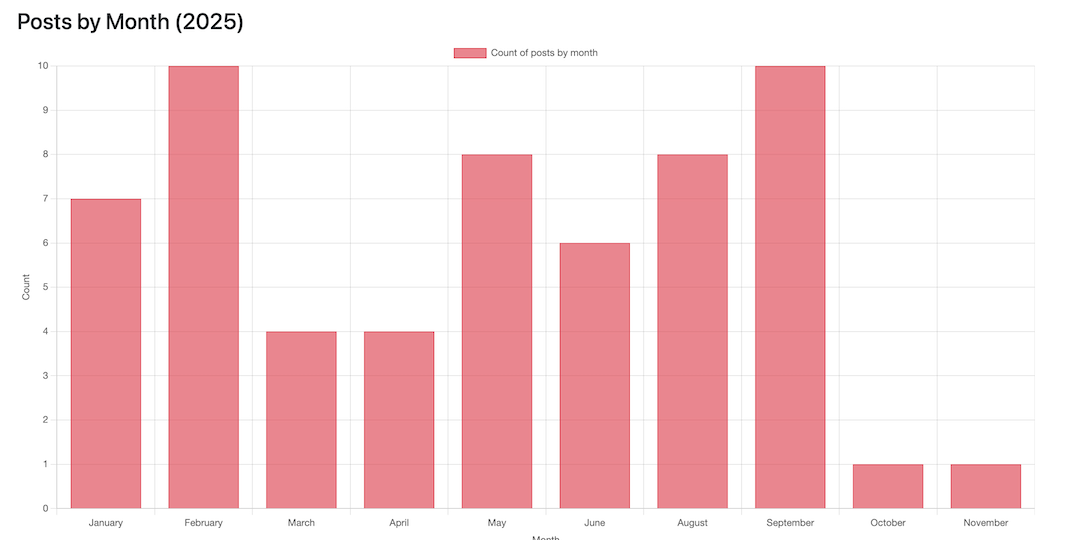
For my February 12 Apps in 12 Months project I wrote a script to produce some simple statistics from a WordPress installation. Looking back at it I realised that it only produced stats for all time and not the previous year, which is what I wanted.
I revisited the code and added in some counts for the previous year and updated the output. You can grab the latest code here but I came across an issue which I thought I would cover here as it might be useful for others.
504 Gateway Timeout
When running the script for another site I run, which has many more posts than this, I found that I was getting a 504 Gateway Timeout, killing the script. Initially, I confused this with a PHP timeout, so I added a set_time_limit(0); to the top of the code, but it made no difference.
Turns out that’s because set_time_limit(0) only affects PHP’s own execution time.
It does not affect web servers, reverse proxies, load balancers, or gateways. A typical request will look like this:
Browser
  ↓
Gateway / Proxy (e.g. Cloudflare, Nginx, Apache, load balancer)
  ↓
PHP / App
Normally, I route everything via Cloudflare, but it just happened that in this case I wasn’t. That was just as well, as you can’t change the timeout limit there. Instead, I needed to change my gateway, Apache in my case.
Here are the typical timeout limits for popular gateways:
| Gateway | Typical timeout |
|---|---|
| Cloudflare | ~100 seconds (hard limit) |
| Nginx | 60 seconds default |
| Apache (mod_proxy) | 60 seconds |
| Load balancer (AWS, etc.) | 30–60 seconds |
Here’s what to do depending on your gateway.
Nginx
proxy_read_timeout 300;
proxy_connect_timeout 300;
proxy_send_timeout 300;
fastcgi_read_timeout 300;
Apache
ProxyTimeout 300
Timeout 300
Cloudflare
If you are using Cloudflare and are getting the 504 error then you options are more limited as you cannot change the timeout limit. In this case you need to redesign the request:
- Poll for status or notify when complete
- Start the task
- Return immediately
- Process in the background
This is obviously more difficult but also the right approach. I am going to look at changing my code to do this at some point.
If you are using PHP-FPM (very likely)
Apache talks to PHP via mod_proxy_fcgi, so you also need this globally (or in the main config):
<IfModule mod_proxy.c>
    ProxyTimeout 300
</IfModule>
Put that in /etc/httpd/conf/httpd.conf and then restart Apache.
After all of that I was good to go.
2025 Stats for this Site
Running the script for this site generated the following (see image below). I wrote more posts in 2025 than ’24 and that’s mainly because of the 12 Apps in 12 Months project which was the main tag after the year. A further consequence of that was the most posts were about development followed by gadgets.
Have a WordPress blog? Try running the code and see what you get or, if you find any issues, raise it here and I’ll fix. Let me know how you get on in the comments.
