
This is the project that I expected to do for my November 12 Apps in 12 Months challenge but, as you will see, that wasn’t actually possible.
Don’t rely on someone else’s API
I had two projects in mind for Day One: sync my WordPress blog posts and my Foursquare/Swarm check-ins to it. I felt that the latter was probably the easier of the two, so I started with that last September.
I went through the OAuth process to get my key and then started making authenticated calls to the https://api.foursquare.com/v2/users/self/checkins endpoint. This should have returned a list of my checkins in JSON format. The problem was that what it was actually returning was:
HTTP/1.1 402 Payment Required.I felt that I shouldn’t really be being charged to access what was essentially my own data, and after some toing and froing, fortunately, Foursquare support agreed. They asked for my patience while they looked into it. It turned out to be two months before they came back to me, but in the meantime, I’d got bored waiting and moved on to the WordPress project instead.
Webserverless Authentication
I wanted to make this Foursquare project as easy as possible for others to use, within the bounds of it needing downloading code and setting up APIs, obviously. One potential pain point was going through the OAuth dance in order to get the access key you need for Foursquare. What I didn’t want was for the user to have to run this on a web sever when the rest would run quite happily from the command line. For this, I turned to ChatGPT and asked it the following:
I want to write an oauth routine that goes off to, Foursquare in this case, goes through the process and then returns and displays the access key. Before we get in to the nitty gritty is there any way to do this from the command line or does the redirect uri prevent this?
The code you see in oauth.php is 99.9% exactly as provided by AI. The only changes I made were to put the constants into the config.php file. I was impressed and particularly with the neat way that it handled the “no webserver” requirement by spinning up a temporary webserver:
// -----------------------------------------------------------
// Start local webserver in background to capture code
// -----------------------------------------------------------

$tmpFile = sys_get_temp_dir() . "/fsq_oauth_code_" . getmypid();
file_put_contents($tmpFile, ""); // empty file acts as storage

$cmd = sprintf(
    'php -S localhost:%d -t %s %s > /dev/null 2>&1 & echo $!',
    LOCAL_PORT,
    escapeshellarg(__DIR__),
    escapeshellarg(__FILE__ . ".router.php")
);
$pid = shell_exec($cmd);
$pid = trim($pid);
In Use
To get your access token, register for a Foursquare developers account, ensuring that you use the same account as your check-ins are registered with. Copy the Client Id and Secret from the OAuth Authentication section to config.php and complete the Redirect URL – I suggest you use exactly as shown here and in the config.php file. Remember to save it!

Now go to the command line and from the code folder run php oauth.php. What should happen now is that a web browser will open and take you through the Foursquare login and authentication process and when that is done return the access token to the command line. Copy this to the field in the config.php file.

That’s the acquisition of the Foursquare access token dealt with.
Can you sort that for me?
I came back to this project a bit later than anticipated and I thought that it ought to be reasonably straightforward. How hard can it be to cycle through a load of check-ins and process them? Actually, quite hard it transpired.
Firstly, I have over 13,000 check-ins to process and once they were done I then needed a way of only processing the new check-ins. I decided that it would be best to work from the oldest record forwards until I had processed all the historical check-ins. Unfortunately you cannot request the records in oldest to newest order so in order some creative coding is required. Foursquare allows you to request 250 records at a time and does tell you how many records you have in total so using this information you can work out the offset and work your way forwards using a call such as:
    $url = "https://api.foursquare.com/v2/users/self/checkins"
        . "?oauth_token=" . urlencode($accessToken)
        . "&v=20250922"
        . "&limit=$limit"
        . "&offset=$offset";
In order to be able to restart after a failure or simply quitting the process I needed to keep a note of how far we had come. For this I needed two pieces of information: the latest offset and the current unique id of the check-in just processed. This is held in the process.json file:
{
  "next_fetch_offset":9000,
  "last_imported_id":"5bbc8306ab123c002abc5bf5"
}
On a restart the code reads the next 250 records from the next_fetch_offset position and then walks through all the entries until it reaches the record with id of last_imported_id. Even with this breaking and restarting can still result in duplicate records being created if you stop the script in the time between the record having been written to Day One but before the id has been written to the progress file.
Adding Maps
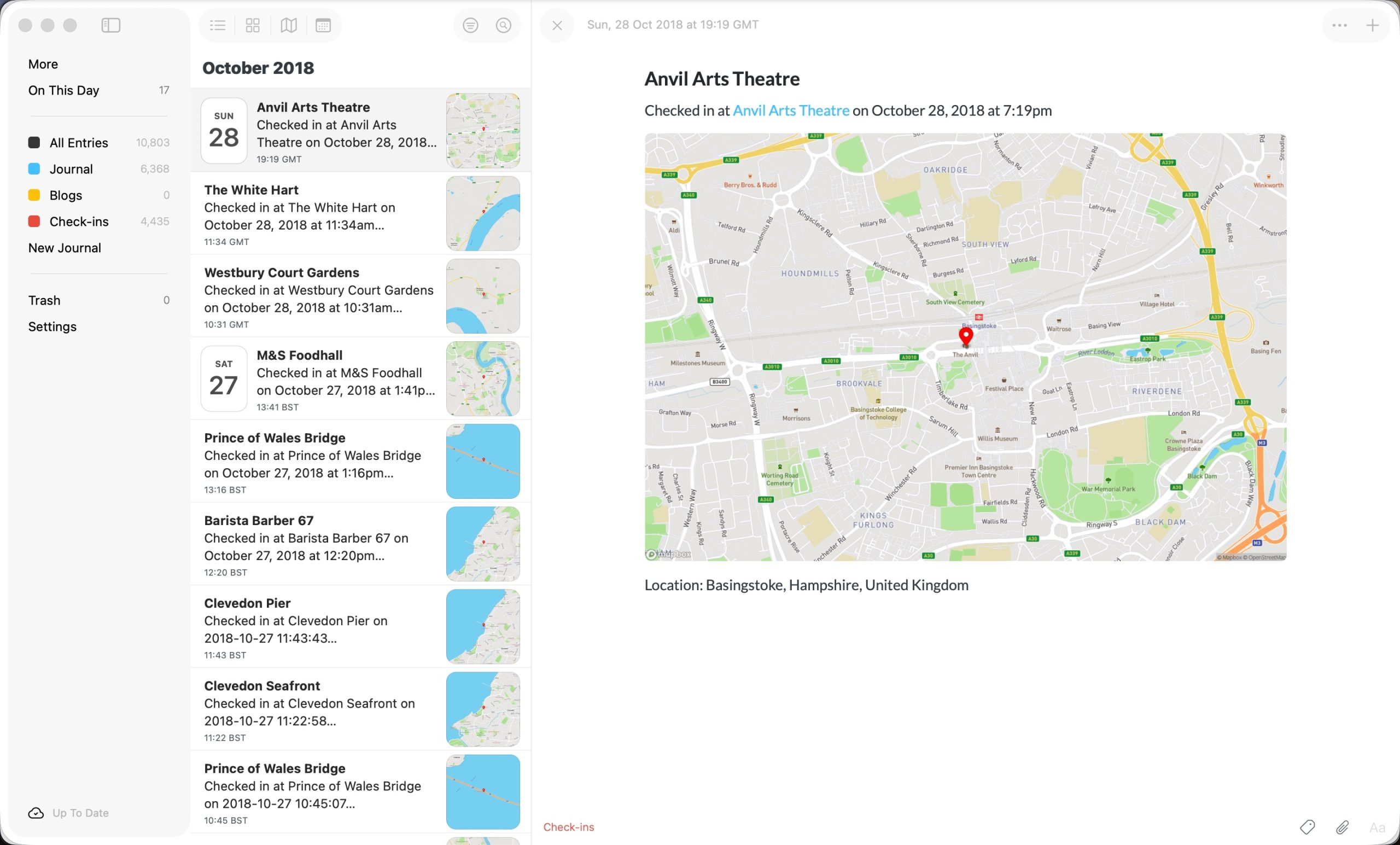
One thing that I wanted to include in each Day One entry was not only details of the check-in location but also a map of where that was. I thought that you could do it using OpenStreetMap but apparently scraping the map tiles directly is a no no. However, you can do it via the Mapbox API where you get a very generous rate of creating 50,000 images a month for free.
The following function handles the creation of the map. Crucially, the maps are cached so that if a subsequent check-in at the same location is found the map is pulled from the cache rather than generating it again from Mapbox. This makes a huge difference as out of 13,714 check-ins there were only 3,684 maps created so there was a lot of reuse.
function generateStaticMap($lat, $lon, $filename, $zoom = 14, $width = 1200, $height = 800)
{
    $lonLatZoom = "{$lon},{$lat},{$zoom}";
    $size = "{$width}x{$height}";
    $marker = "pin-l+ff0000({$lon},{$lat})"; // red pin at the checkin location

    $url = "https://api.mapbox.com/styles/v1/mapbox/streets-v11/static/{$marker}/{$lonLatZoom}/{$size}?access_token=" . MAPBOX_TOKEN;

    $imageData = @file_get_contents($url);
    if ($imageData === false) {
        error_log("Failed to download map for {$lat},{$lon}");
        return false;
    }

    return file_put_contents($filename, $imageData) !== false;
}
I’m really pleased with the outcome:
Adding to Day One
The final task was to tie it all together and add an entry in Day One. Given that I had just done exactly the same thing in the previous project this was really straightforward. This meant taking the constituent parts and stitching them together into a Markdown string as follows:
$content = '# ' . $venue . PHP_EOL . PHP_EOL;
    $content .= 'Checked in at [' . $venue . '](' . $url . ') on ' . $formattedLongDate . PHP_EOL . PHP_EOL;
    if (INCLUDE_MAPS) $content .= '[{attachment}]' . PHP_EOL . PHP_EOL;
    $locationParts = array_filter([$city, $stateLoc, $country], fn($p) => !empty($p));
    $content .= 'Location: ' . implode(', ', $locationParts) . PHP_EOL;

    $cmd = 'dayone --journal "' . addslashes(DAYONE_JOURNAL) . '" --date "' . $formatted_date . '"';
    if (INCLUDE_MAPS) $cmd .= ' --attachments ' . escapeshellarg($mapFile) . ' --';
    $cmd .= ' new ' . escapeshellarg($content);
Running the Script
Now that the code is complete we can run it using the following command with no parameters:
php f2do.phpIf you have logging turned on then you will see output similar to the following and entires will appear (slowly) in Day One too.

Good to Know
Importing the entries into Day One is a slow and intensive process. My 13,000+ check-ins took 3 1/2 hours and while that was taking place the CPU took a hammering and Day One consumed 4.5 gb of memory. Whether that’s a problem for you or not will depend on the spec of your Mac.

The other thing to be aware of is that it can take a very long time for Day One to catch-up and show the check-ins imported. This can be minutes so don’t be alarmed if you are watching the terminal output and then you can’t see the entries listed in Day One. They will appear eventually.
The final thing is that the calls to Foursquare don’t seem to be rate limited so I was able to process all my entries in one go.
Wrapping up
That’s a fairly comprehensive look at my final project for 2025. I’ll do a full write-up on my thoughts of how it has gone and plans for the future but, for now, if you want to check out the code for this project head on over to Github.
One comment on “Exporting Foursquare check-ins to Day One”